Create Tag Beam — tag family, orientation and offset
Open BimSpeed.STR → Common → Create Tag Beam in a view that supports Structural Framing Tags. Load a compatible tag family/type. Creating tags does not assign unique beam Marks.
| Control | Meaning |
|---|---|
| Tag Family/Type | Annotation family symbol controlling appearance/labels, not the beam family. |
| Length to tag | mm, reviewed initial value 1000. Placement distance from the beam reference, with half beam width added in the reviewed position branch; not a universal leader length. |
| Horizontal / Vertical | Annotation orientation. Test both on separate beams and inspect text collisions. |
| OK | Confirms and starts beam picking. Follow the active-view prompts and Finish/Esc at the appropriate step. |
| Tutorial | Opens help; it does not create tags or save the model. |
Select the created tag and inspect host ID, tag type, orientation and head position. Compare its displayed value with beam Properties. Different beams can show the same Mark when source data duplicates it. Increasing 500→1000 mm should move the annotation farther away; measure the actual result.
Load a missing compatible tag rather than substituting a Text Note as tool output. Check repeated-run duplicates, owning view and linked/host beam scope. Undo incorrect tags, save/reopen the view/sheet and inspect display at the intended scale. Remembered type/orientation settings are separate from saved RVT annotations.
Observed Revit images
Captured in Revit 2024 on a project copy using tool windows opened independently. UI screenshots do not establish the complete ribbon/picking/generation flow. Click an image to open the unchanged original at full resolution.
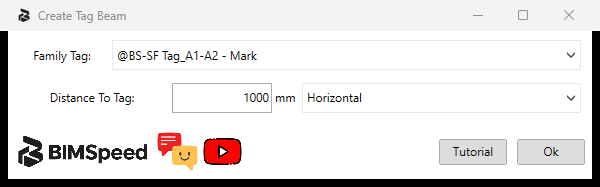
- Select an available Beam Tag type.
- Distance in mm and tag orientation.
- Tutorial opens help; OK continues selection and tagging. No tags were placed in this capture.
Practice input
Download the shared Revit 2024 column/foundation input. This educational file has four rectangular columns and one footing; it is not output from this article's command. Read the ZIP README/provenance and Save As before editing. It does not contain every roof, pile, link, Legend or dimension case; prepare the categories/grids/views/families required above. Screenshots on a real-project copy do not imply distribution of its private RVT.
Observed build and verification scope
The family, distance, orientation and Vietnamese/English actions were reviewed on a project copy. Beams were not picked and tags were not created. An available tag-family name does not establish compatibility with every beam.