Beam drawing — complete settings reference
Drawing walkthrough · Cross section · Longitudinal detail
Drawing, Detail and Section share one window and open on different tabs. These are production windows hosted by Revit 2027.3, captured by the 24 October 2026 smoke using the actual English UI. The right-hand diagram is a preview; separate result images in the walkthrough show model views/sheets.
Image map: 1 choose a tab; 2 enter settings and scroll down; 3 inspect the schematic; 4 close or apply. Each control is mapped to source below; not every combination was exercised in model generation.
Drawing
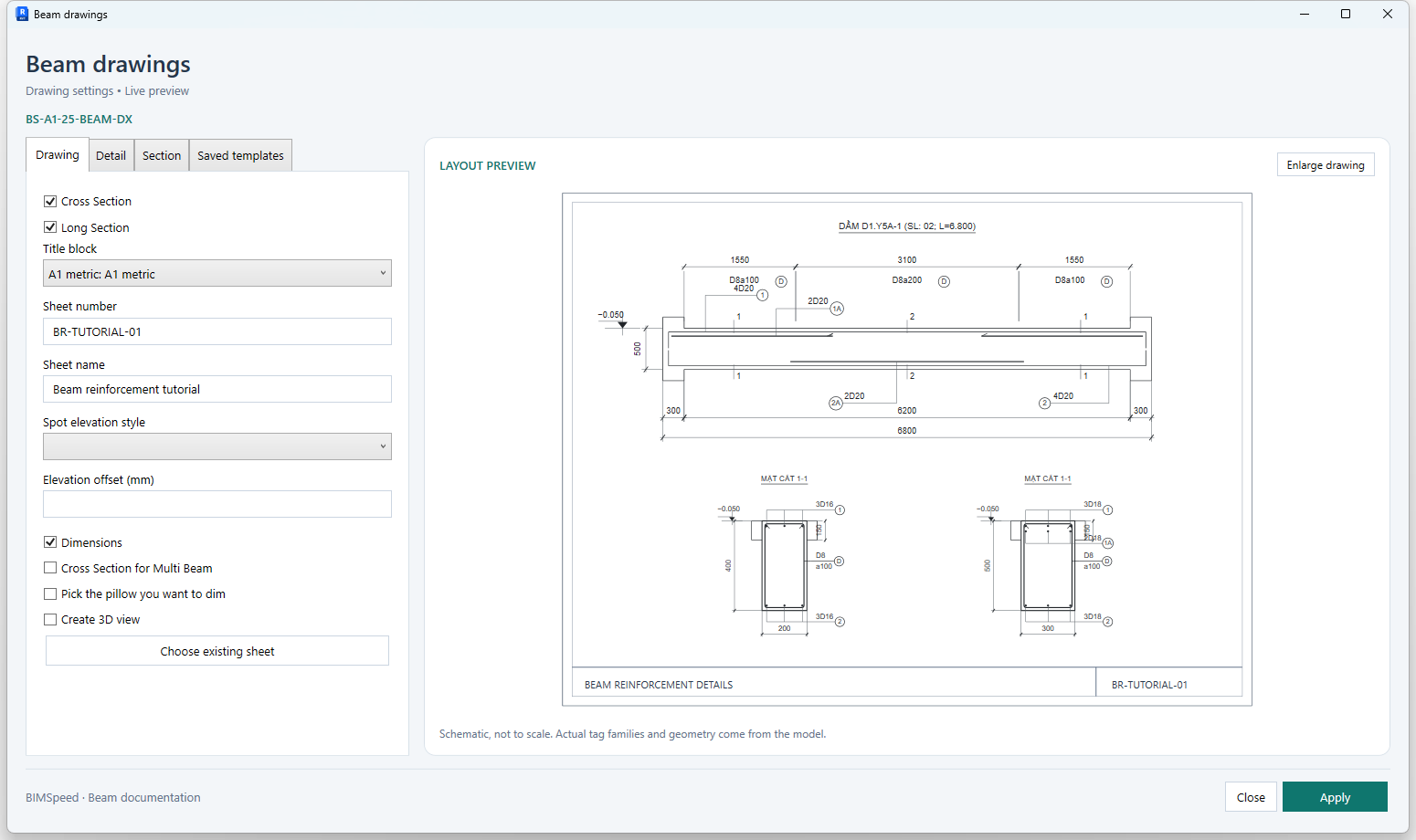
| UI control | Effect and verification |
|---|---|
| Cross Section | Include transverse sections; inspect the section viewports on the sheet. |
| Long Section | Include the longitudinal detail; inspect its spans and length. |
| Title block | Choose a loaded title block family/type. This selector may be disabled for an existing sheet. |
| Sheet number | Proposed sheet number; check for duplicates before creating a new sheet. |
| Sheet name | Sheet name shown in Project Browser and the title block. |
| Spot elevation style | Choose an existing spot elevation type; required when elevations are enabled. |
| Elevation offset (mm) | Elevation annotation offset in mm. Inspect the leader and annotation position. |
| Dimensions | Enable dimensions across the settings; check both Detail and Section dimension types. |
| Cross Section for Multi Beam | Draw cross sections for multiple beams; the command validates each beam separately rather than requiring one aligned run. |
| Pick the pillow you want to dim | Pick additional beam supports to dimension after selecting the main beams. |
| Create 3D view | Create a beam 3D view in the Drawing pipeline; this is separate from the settings preview. |
| Choose existing sheet | Open the sheet finder, filter by name/number and choose a sheet. Verify the copied number/name; this does not generate a drawing. |
Detail
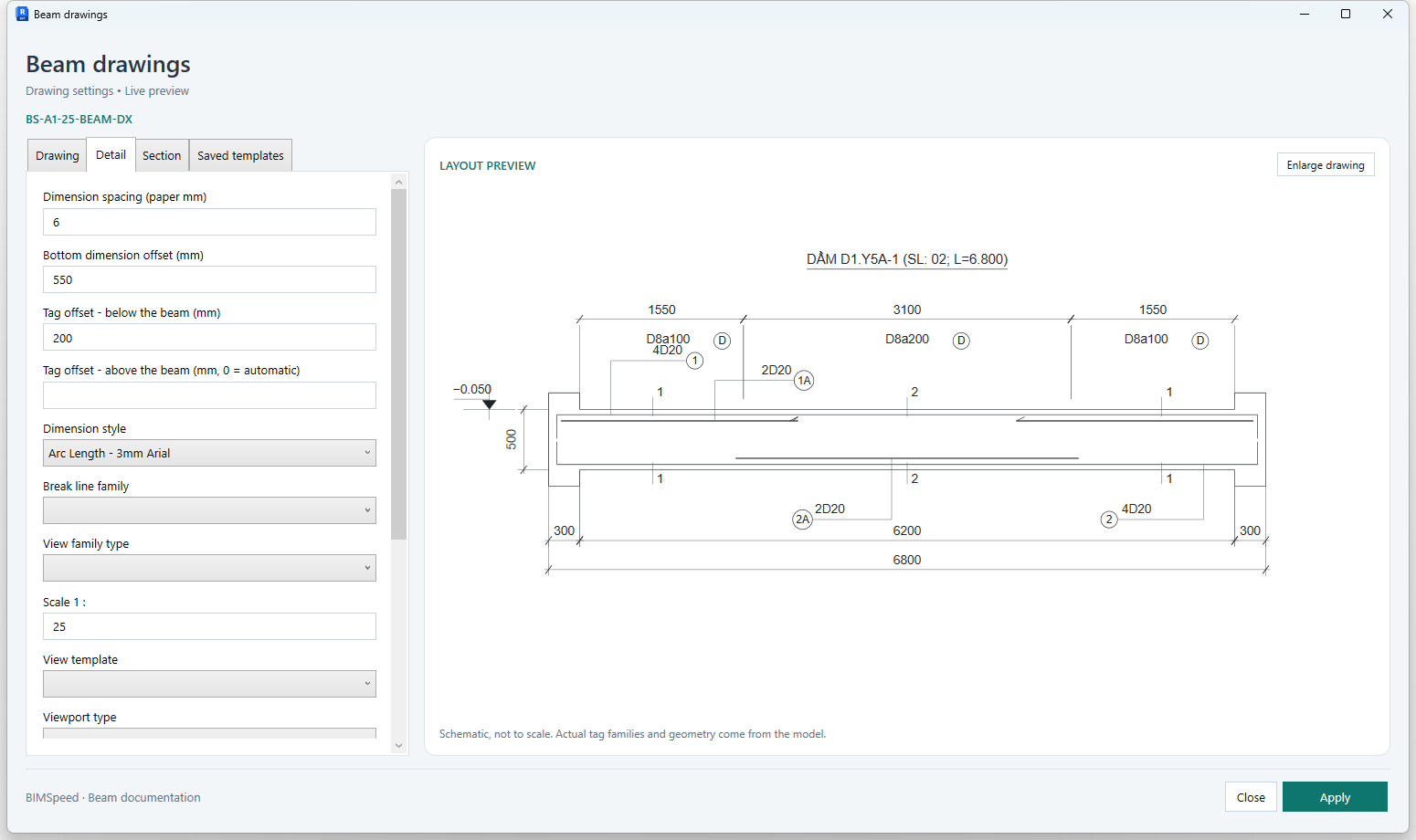
Scroll to expose the remaining fields: 1 · 2.
| UI control | Effect and verification |
|---|---|
| Dimension spacing (paper mm) | Spacing between dimension lines in paper mm. Increase to separate chains; decrease to compact them. Inspect at print scale. |
| Bottom dimension offset (mm) | Bottom dimension offset in model mm; increasing it moves the dimension away from the beam. |
| Tag offset - below the beam (mm) | Bottom reinforcement tag offset in model mm; keep tags clear of the beam and dimensions. |
| Tag offset - above the beam (mm, 0 = automatic) | Top reinforcement tag offset in mm; 0 selects automatic placement. Check section heads and stirrup tags. |
| Dimension style | Choose a loaded linear dimension type; inspect its font, units and ticks in the result. |
| Break line family | Choose a curve-based detail family for break lines; a suitable family is required when break lines are enabled. |
| View family type | Choose the appropriate section/detail view family. ViewSection.CreateSection requires a Section family, not an Elevation type. |
| Scale 1 : | Scale denominator: 25 means 1:25. A larger denominator makes the drawing smaller on paper; check text and cropping. |
| View template | Choose a loaded ViewSection template; it may control visibility and scale. The current Apply validation requires both Detail and Section templates. |
| Viewport type | Choose the viewport type for its sheet title. The list may be empty when the model has no existing viewport. |
| Main bar tag — left | Left main-bar tag family/type; compare its text, quantity and diameter with model rebar. |
| Main bar tag — right | Right main-bar tag family/type; verify its leader direction after layout changes. |
| Stirrup tag — left | Left stirrup tag family/type; verify diameter and spacing for the annotated zone. |
| Tag reinforcement | Enable reinforcement tagging; supply all required tag families when enabled. |
| Rebar break symbols | Enable rebar end/break symbols in the detail. These annotations do not cut model rebar. |
| Detail view name | Name used for the detail view by the drawing pipeline; inspect it in Project Browser. |
Section
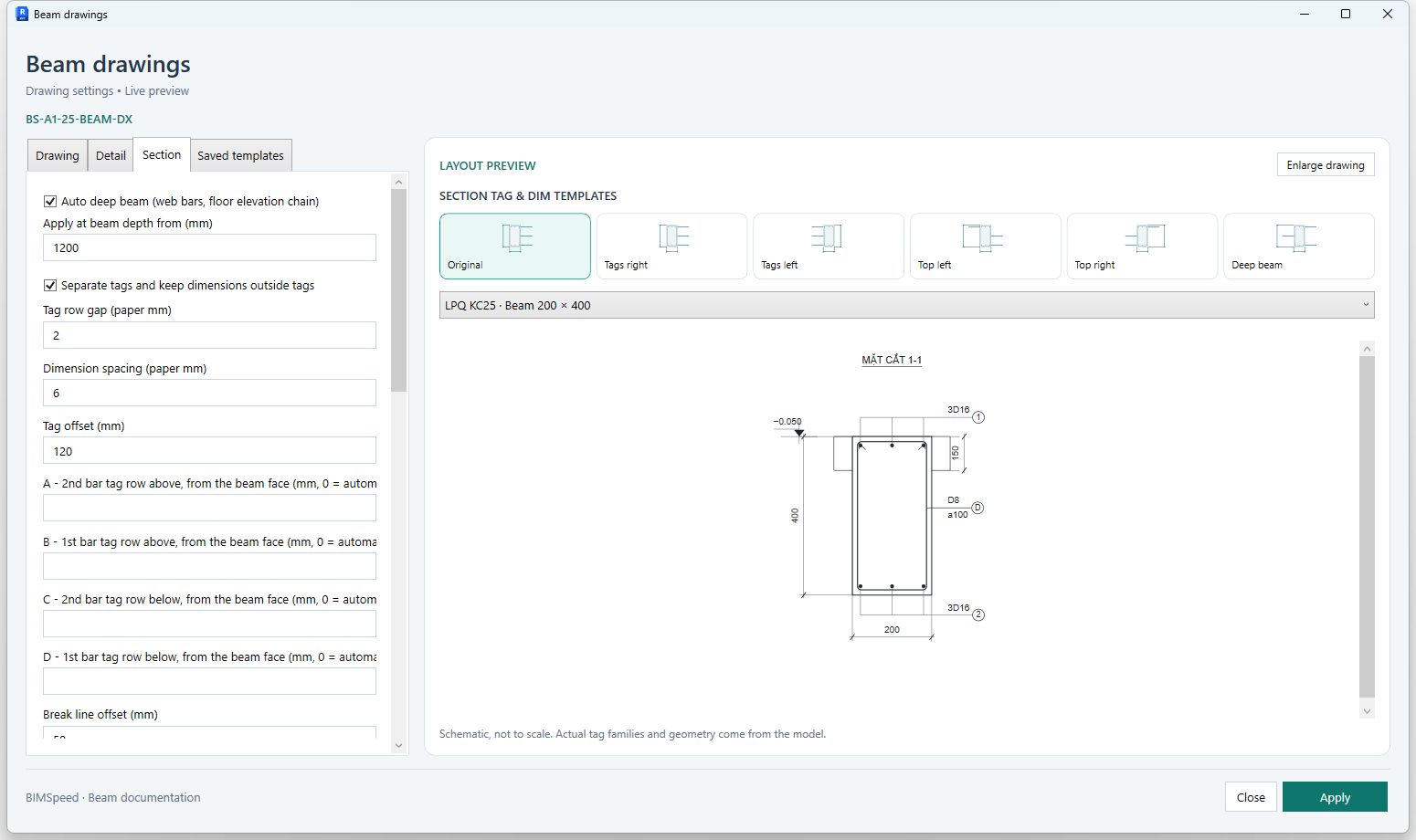
Scroll to expose the remaining fields: 1 · 2.
| UI control | Effect and verification |
|---|---|
| Auto deep beam (web bars, floor elevation chain) | Enable deep-beam annotation layout at the threshold; inspect web-bar tags and elevation chains. |
| Apply at beam depth from (mm) | Depth threshold in mm; source validation accepts at least 300 mm, with a 1200 mm default. This controls annotation layout. |
| Separate tags and keep dimensions outside tags | Separate tag rows and keep dimensions outside tags. Visually inspect actual results because family text sizes vary. |
| Tag row gap (paper mm) | Tag-row gap in paper mm; source validation requires a finite non-negative value. Increase to separate text; decrease to compact rows. |
| Dimension spacing (paper mm) | Dimension-line spacing in paper mm; recheck after changing section scale. |
| Tag offset (mm) | Tag-to-beam offset in model mm; affects leaders, not reinforcement positions. |
| A - 2nd bar tag row above, from the beam face (mm, 0 = automatic) | A: second top bar-tag row measured from the beam face; 0 is automatic. Compare with B to avoid coincident rows. |
| B - 1st bar tag row above, from the beam face (mm, 0 = automatic) | B: first top bar-tag row measured from the beam face; 0 is automatic. |
| C - 2nd bar tag row below, from the beam face (mm, 0 = automatic) | C: second bottom bar-tag row measured from the beam face; 0 is automatic. Compare with D for layered reinforcement. |
| D - 1st bar tag row below, from the beam face (mm, 0 = automatic) | D: first bottom bar-tag row measured from the beam face; 0 is automatic. |
| Break line offset (mm) | Break-line offset in mm; used when break lines are enabled and a suitable Detail family is selected. |
| Side dimension offset (mm) | Side dimension offset in mm; check clearance from reinforcement tags. |
| Bottom dimension offset (mm) | Bottom dimension offset in mm; inspect clearance from rows C/D. |
| Dimension style | Section dimension type; inspect width/depth measurements and displayed units. |
| View family type | View family type used for transverse sections; choose a compatible Section type. |
| Scale 1 : | Section scale, independent of Detail; 25 means 1:25. |
| View template | Section view template; check that it does not hide rebar or lock unintended settings. |
| Viewport type | Section viewport type on the sheet; inspect its title and underline. |
| Single bar tag — left | Left single-bar tag; select the correct loaded Rebar Tag family. |
| Grouped bar tag — left | Left Multi-Rebar Annotation type; it must reference a valid tag family. |
| Stirrup tag — left | Left section stirrup tag; inspect spacing text and its leader. |
| Grouped bar tag — right | Right Multi-Rebar Annotation type; verify that its tag type exists in the model. |
| Single bar tag — right | Right single-bar tag; compare it with the left tag when switching layouts. |
| Stirrup tag — right | Right stirrup tag; validation checks both stirrup tags when tagging is enabled. |
| Draw break lines | Enable break lines; requires a curve-based Detail family. The documentation smoke disables this option and records it in its inputs. |
| Tag reinforcement | Enable section rebar tags; requires left/right single, grouped and stirrup tag types. |
| Spot elevations | Enable spot elevations; requires a loaded elevation type. The practice run disables elevations when no spot style is available. |
| Slab thickness dimensions | Enable slab-thickness dimensions in the section; verify the slab intersecting the beam. |
| Section view name | Section view name; inspect the actual name because a suffix may be needed for uniqueness. |
Saved templates
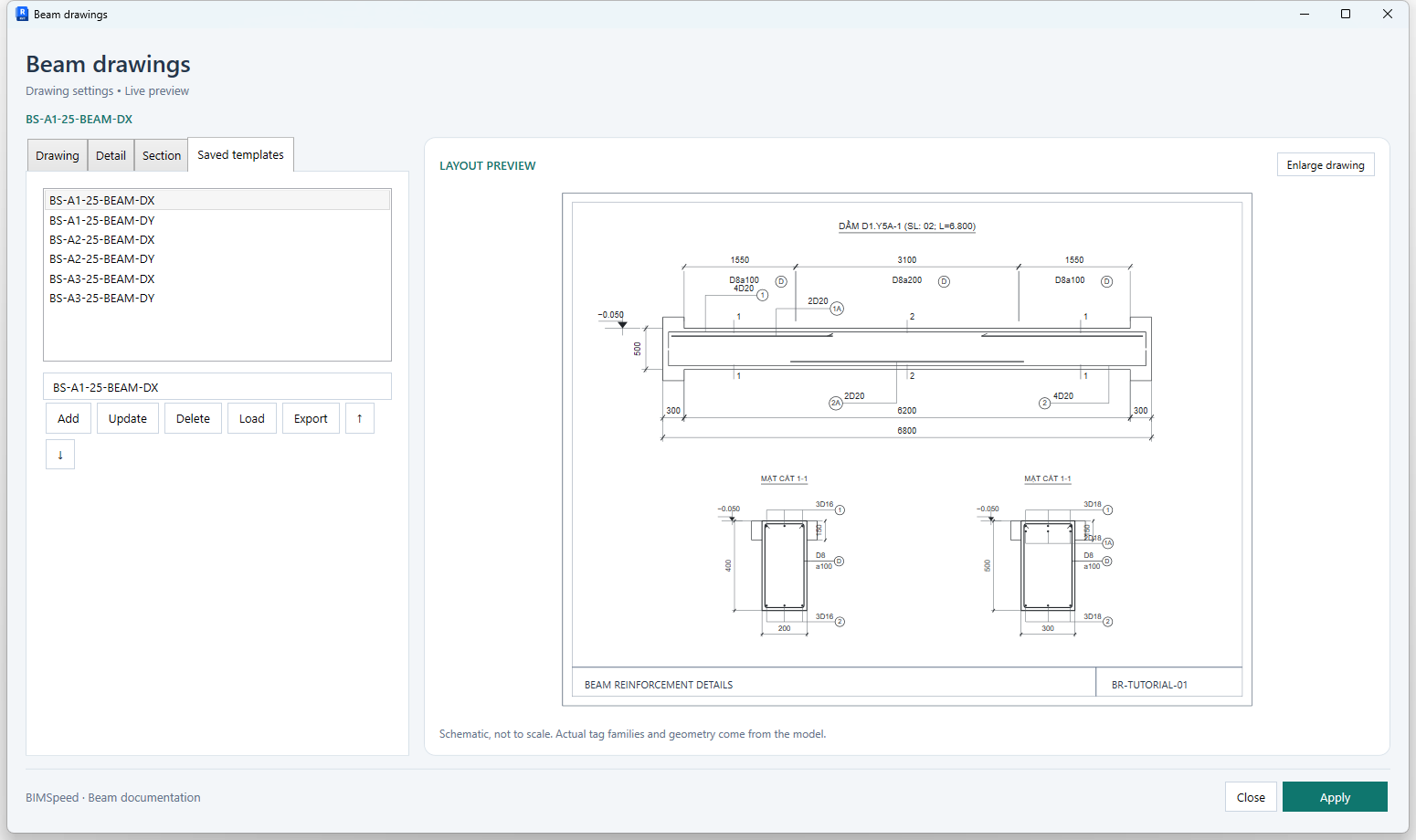
| UI control | Effect and verification |
|---|---|
| Danh sách mẫu / Preset list | Select a preset to load its settings into the window. |
| Tên mẫu / Preset name | Preset name; Add/Update require a non-empty name. |
| Add | Add a preset with the entered name; verify the new list entry before closing. |
| Update | Update the selected preset; export a copy first when the previous settings must be retained. |
| Delete | Remove the selected settings preset; this is not a command to delete beams or reinforcement. |
| Load | Load presets from a file; recheck family/type mappings in the current model. |
| Export | Export settings to a file for reuse; this does not export a drawing or RVT model. |
| ↑ | Move the preset upward in the list; inspect the resulting order. |
| ↓ | Move the preset downward in the list; this does not reorder sheet viewports. |
Preview controls, buttons and scope
| Control | Purpose |
|---|---|
| Legacy | Original annotation layout. |
| Right | Right-side tag layout. |
| Left | Left-side tag layout. |
| Split | Split-row layout illustrated by the preview. |
| Reverse | Reversed layout illustrated by the preview. |
| Deep | Deep-beam annotation layout; check the depth threshold and web bars. |
| Geometry selector | Normal, Wide, Deep, Layers and StressWide are schematic cases, not model beam selections. |
| Enlarge drawing | Open a larger preview window; this does not open a generated Revit view. |
| Close | Close the window without proceeding to the command's drawing stage. |
| Apply | Commit the focused editor, check binding errors and required inputs, then continue the command. |
This window has no story/branch override tree like Beam Rebar Axis. The selected settings apply to the current command run. The smoke captured the preset library without overwriting or deleting user presets.
Missing-input validation
Check both Detail and Section, including hidden tabs: templates, view family types and scales; dimension types when dimensions are enabled; left/right single, grouped and stirrup tags when tagging is enabled; a spot type for elevations; a curve-based break family for break lines; and the sheet number/name. Each MRA type must reference a valid tag family. If the installation's library is missing, use Load Families Types and reopen the tool to refresh its type lists.
The smoke loaded two repository tag families, created a dedicated Section template on the copy, chose real tag/dimension types, and disabled break lines and elevations when their required types were absent. These are fixture conditions, not permission to leave required inputs blank in every model.
Deliberate changes
- Dimension spacing 6 → 10 paper mm should separate chains; 10 → 6 should compact them. Inspect at print scale.
- Tag-row gap 2 → 4 paper mm should separate tag rows; decrease it to compact them. Inspect actual family text, not just the preview.
- Detail 1:50 → 1:75 makes the beam smaller on paper. The smoke sheet uses 1:75 detail and 1:25 sections to reserve the title-block strip.
- Change A/B/C/D from 0 to explicit mm distances to replace automatic row offsets. Inspect both upper and lower rows.
Spacing/gap/row examples are source-based exercises; paired runtime measurements have not been collected for every change. They do not establish automatic drawing quality.