Beam Axis: settings and bar quantities
Use this with the Beam Axis walkthrough. Open 02-Beam-Axis-Revit-2027.rvt from the practice ZIP and Save As.
First choose the scope
The right-panel breadcrumb reads Project → Axis → Run → Span / Joint / Bar. More specific values override common values. ○ is inherited, ● ↩ is overridden, and ↩ resets an override. A layout template supplies the run's starting arrangement.
| Apply to | Select | Example |
|---|---|---|
| Whole project | Detailing standard… / Project | Cover, anchorage, lap, joints, sheets. |
| One axis | Axis | Common values for AX-C; run overrides still win. |
| One multi-span run | Run in the left list | 3Ø20 top bars through run N3; Ctrl-select runs to edit them together. |
| One span | Click the span on canvas or in the table | Change only span 2's bottom bars or stirrup a1/a2. |
| One joint | Click its support/node | Change anchorage/lap there. |
| One bar set | Click a bar or section dot → Bar | Count, diameter, covered spans, anchorage, split/merge/delete. |
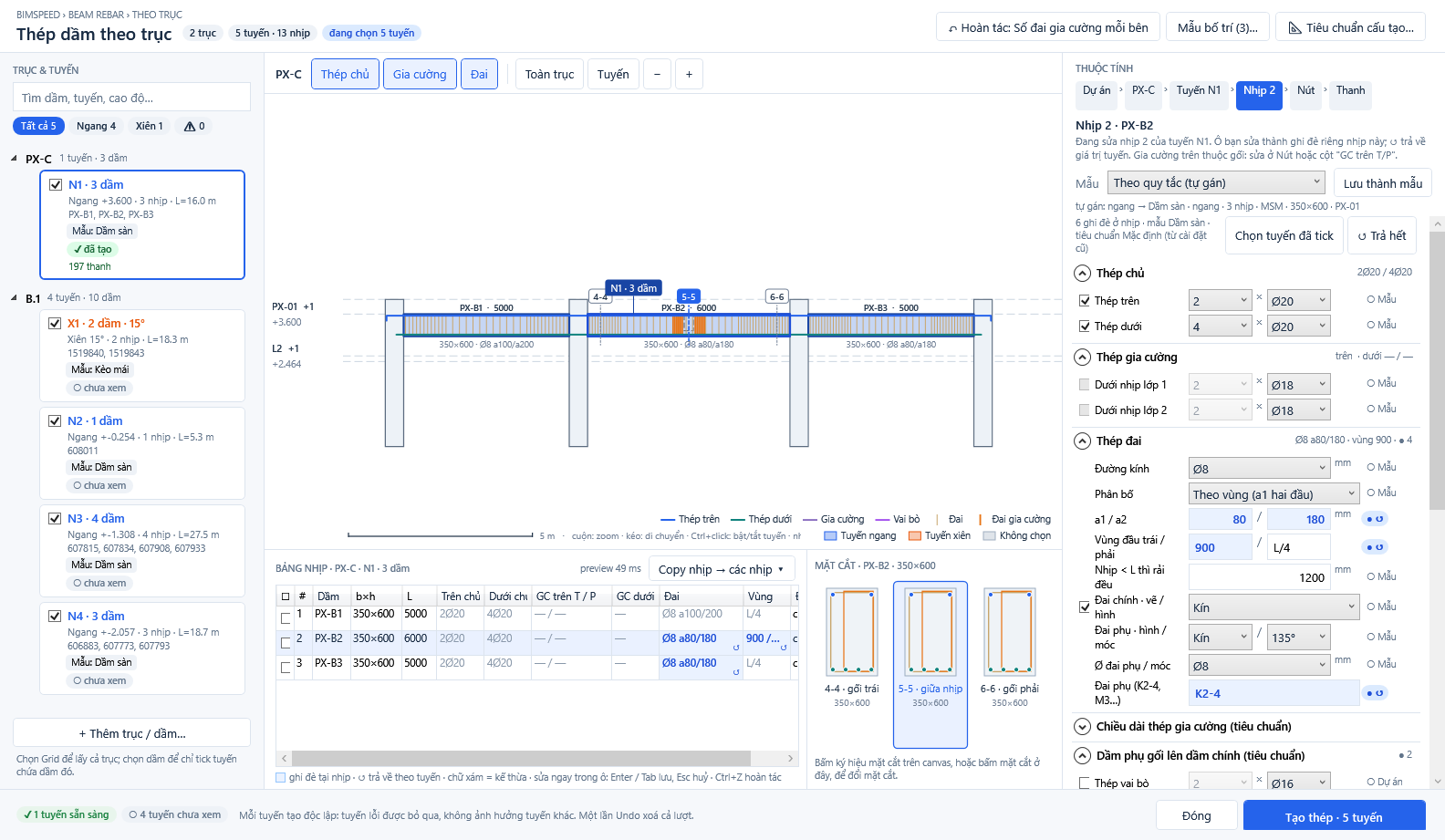
① Span scope; ② top/bottom main bars; ③ stirrup diameter, a1/a2 and end zones; ④ editable span table and copy action.
Typical bar-quantity changes
| Goal | Action | Verify |
|---|---|---|
| More top bars for a run | Run → Main bars → Top → Count, e.g. 2 → 3; set diameter. | Canvas, sections, and span table show three bars; quantity/mass increase. |
| Fewer bottom bars in one span | Span → Main bars → Bottom → Count, e.g. 4 → 3. | Only the selected span changes. |
| Change diameter alone | Change Ø (mm) beside the count at Run/Span/Bar. | Check cover, clear spacing, and section position. |
| Add a main-bar layer/set | Bar → + Add main bar set, choose top/bottom, layer, start/end span, Count × Ø. | No duplicate set appears on canvas or section. |
| Reduce/delete a set | Select a bar → lower Count × Ø, or use Delete/Delete all only for the intended set. | Inspect every span that set crossed. |
| Split/merge at supports | Bar → Split at support 2/3 or Merge with adjacent set; set left/right anchorage Lx × Ly. | Review joint geometry and run Check. |
| More/fewer extra bars | Run/Span → enable/disable an Additional layer; edit count, diameter, length around support/span. | Toggle Additional on canvas and check GC top/bottom in span table. |
| More stirrups | Span → Stirrups → a1/a2, decrease spacing, e.g. 180 → 120 mm. | Stirrups appear denser in the selected zone. |
| Fewer stirrups | Increase a1/a2 or revise end-zone length if design permits. | Inspect end/middle zones, then Check. |
| Change stirrup type | Stirrups → diameter, distribution, main/secondary stirrup shape and hooks. | Check section and cover warnings. |
| Copy one span's settings | Edit source span → Copy span → other spans. | Target cells turn blue for overrides; review each span. |
| Edit several runs | Ctrl-select run cards, edit a field on the right. Mixed values appear as —. | Review each selected/ticked run. |
| Revert to inherited value | Click ↩ or Reset all at the current scope. Window Undo reverts the most recent settings edit. | Field returns to ○. |
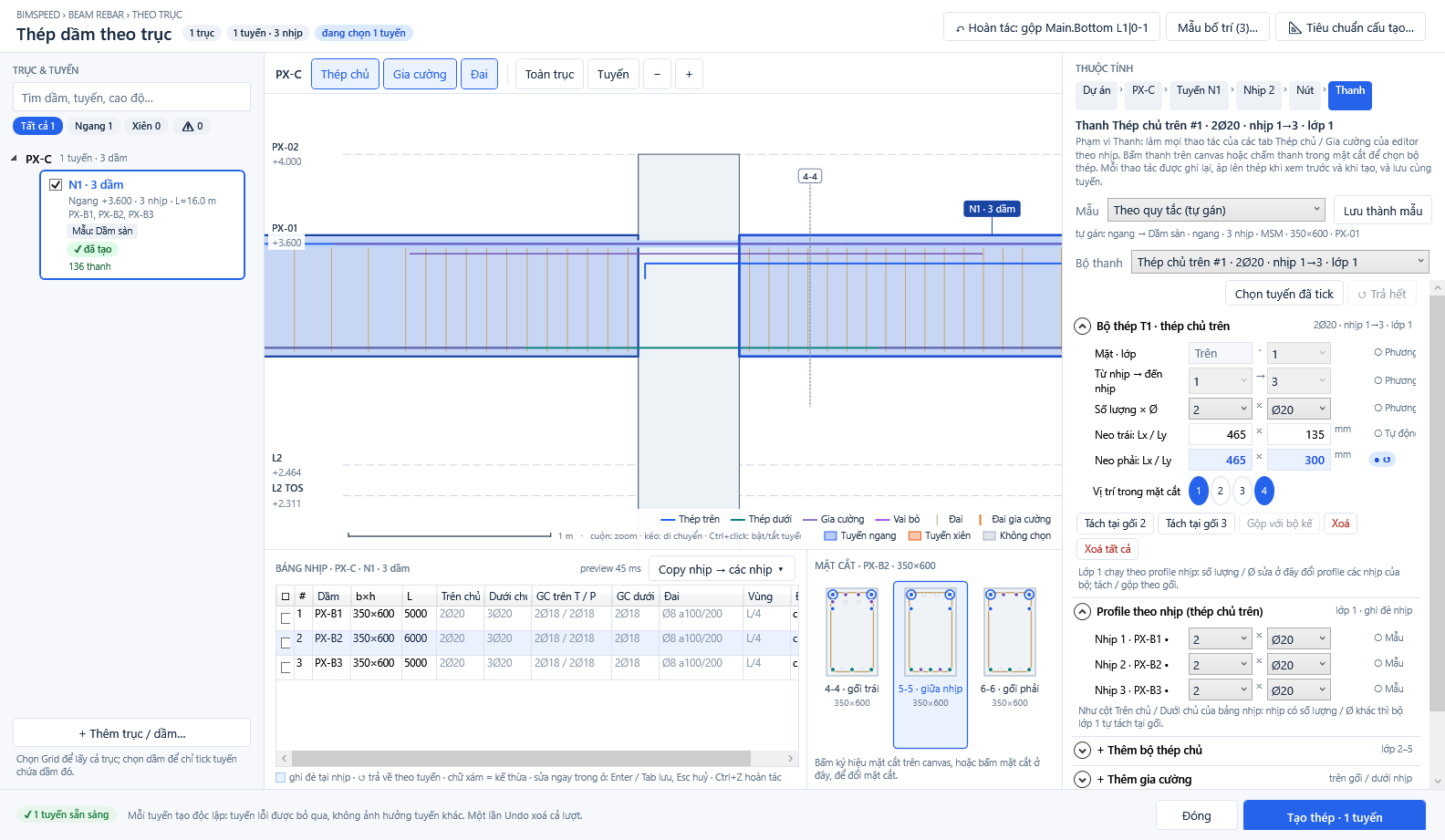
① selected Bar set; ② count, diameter, covered spans, anchorage, split/merge/delete; ③ per-span profile and add-set controls.
Detailing standard groups
Detailing standard… manages named profiles: duplicate, rename, JSON import/export, load old Beam Rebar settings, Apply to project, and Save. Invalid fields block saving.
| Group | Purpose |
|---|---|
| Materials, cover, clearance, rounding | Bar position and spacing limits; check this after diameter/count changes or cover warnings. |
Support anchorage (n × d) | Bar extensions into columns, walls, beams and foundations; affects bar end shapes. |
| Frame joints | Hook direction, outer bars at convex/concave roof joints, laps and minimum anchorage; JOINT_ANCHOR_SHORT needs engineering review. |
| Additional-bar lengths | Span/support fractions for top/bottom extra bars. |
| Support bars and secondary-beam intersections | Chair bars, shoulder bars and extra stirrups at intersecting beams. |
| Chairs and bars by beam width | Chair/hook arrangement and auto count by beam width. |
| Section positions | 1-1/2-2/3-3 locations as span fractions; changes drawings rather than bar count alone. |
| Shop lengths and laps | Cut/stock lengths and continuity of bar sets over spans. |
| Drawings & sheets | Sheet numbering, views, tags, dimensions and title block when Create drawings & sheets is enabled. |
After any edit, review Elevation and 3D, run Check (trial write rolled back), then Create bars · N runs. Creating again replaces this tool's previous bars for those runs. Use Revit Undo for created bars; window Undo affects settings only. If quantities do not change, inspect the selected scope, narrower overrides, ticked runs, and whether Create was rerun.
Counts and stirrup spacings above illustrate UI operations; the engineer must confirm strength, cracking, anchorage, laps, and seismic detailing.